Meta Description: Master your 2026 edge computing setup with this technical blueprint. Learn to deploy Edge AI, secure local nodes with Zero Trust, and outrank the cloud.
In 2026, the architectural pendulum has swung away from the “Cloud-First” era toward a more resilient, localized reality known as Distributed Compute Architecture. Organizations are no longer willing to pay the “latency tax” of sending every byte of data to a central data center. Whether you are managing an automated factory floor, a fleet of humanoid robots, or a secure healthcare facility, setting up an edge environment is now a survival requirement.
This guide provides a comprehensive, technical walkthrough for setting up an edge computing environment that satisfies 2026’s demands for speed, privacy, and local intelligence.
1. The “Sinking” Concept: Why Logic is Moving to the Edge
Before diving into cables and code, it is vital to understand the “Sinking” strategy. In 2026, we categorize data by its “shelf life.”
-
Instant Logic: Decisions required in <10ms (e.g., collision avoidance) must “sink” to the device level.
-
Operational Logic: Decisions required in <100ms (e.g., anomaly detection) sit on a local gateway.
-
Historical Logic: Deep analytics that can wait seconds or minutes are uploaded to the cloud.
By setting up an edge layer, you effectively “sink” the compute power to the physical location where the data is born.
2. Step 1: Workload Identification & “Agentic AI” Scoping
The first step isn’t buying hardware; it’s defining the Intent of the Node. In 2026, we differentiate between “Legacy IoT” (simple sensors) and “Agentic AI” (autonomous agents).
Key Question: Will your edge node need to run a Small Language Model (SLM)?
If your setup requires real-time reasoning—such as a robot parsing natural language commands—you need hardware with at least 100 TOPS (Trillion Operations Per Second) to cross the “Golden Benchmark” for local inference.
Use Case Decision Matrix
| Industry | Setup Priority | Core Metric |
| Manufacturing | Robotics & Vision | <5ms Jitter |
| Healthcare | Privacy & Data Sovereignty | HIPAA/GDPR Compliance |
| Retail | Inventory Vision AI | Bandwidth Cost Reduction |
| Remote/Mining | Offline Resilience | Starlink Integration |
3. Step 2: Hardware Provisioning (The Gateway Layer)
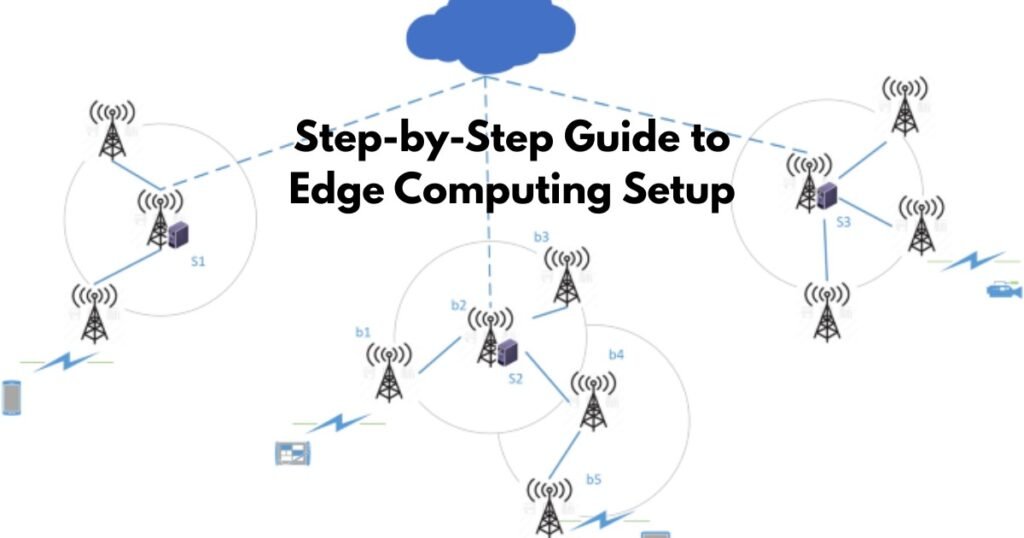
Your edge hardware is the bridge between Southbound Protocols (connecting to sensors) and Northbound Protocols (connecting to the cloud).
Hardware Tiers for 2026
-
Light Edge (The Micro-Node): Raspberry Pi 5 or NVIDIA Jetson Nano. Best for simple MQTT message brokering.
-
Industrial Edge (The Workhorse): Ruggedized units like the Dell PowerEdge XE or HPE Edgeline. These are built for high-vibration and extreme-temperature environments.
-
AI-Heavy Edge (The Brain): NVIDIA Orin NX (SUPER) or specialized NPUs (Neural Processing Units). Essential for running quantized LLMs like Llama 3.1 (8B) locally.
4. Step 3: Operating System & “Zero-Trust” Security
Standard Windows or Desktop Linux won’t cut it. You need a Containerized Runtime environment.
Recommended OS: Ubuntu Core or Fedora IoT
These operating systems are “immutable,” meaning the core files cannot be changed. This is your first line of defense against physical tampering.
Setup Instructions:
-
Flash the OS: Use a tool like BalenaEtcher to flash your image onto an NVMe SSD (avoid SD cards for 2026 reliability).
-
Enable TPM 2.0: Ensure your hardware’s Trusted Platform Module is active. This creates a hardware-level “Root of Trust” that ensures your device only runs authorized code.
-
Zero-Touch Provisioning (ZTP): Use a tool like ZEDEDA or Azure IoT Edge to allow the device to “call home” and configure itself as soon as it hits the internet.
5. Step 4: Deploying Lightweight Kubernetes (K3s)
In 2026, Kubernetes is the language of the edge, but standard K8s is too heavy. We use K3s—a 100MB binary that provides full orchestration with half the memory footprint.
How to Install K3s in 30 Seconds:
Run the following script on your edge node:
curl -sfL https://get.k3s.io | sh -
Once installed, use Portainer or Lens to manage your containers visually. This allows you to deploy “Edge Microservices” globally from a single dashboard.
6. Step 5: Setting Up Local LLMs & Small Models
The “Small Model” boom is the biggest gap in most 2026 edge setups. Instead of calling a GPT-4 API (which is slow and expensive), you deploy a local model.
Procedural Breakdown:
-
Download a Quantized Model: Use the GGUF format for efficiency.
-
Runtime: Use Ollama or vLLM as your local inference engine.
-
Connect to Logic: Use a local API endpoint to allow your sensors to “ask” the AI questions about the data they are seeing.
7. Step 6: Protocol Bridging (The Southbound Setup)
Your edge node must speak “Industrial.” You need to configure software bridges to ingest data from various sources:
-
MQTT: The standard for IoT.
-
OPC-UA / Modbus: For factory PLC (Programmable Logic Controller) integration.
-
RTSP: For Vision AI and camera feeds.
Pro-Tip: Use an open-source tool like Node-RED to create a visual data flow between these protocols and your AI inference engine.
8. Latency & Bandwidth Savings: The 2026 ROI
Why go through this trouble? The cost of cloud egress (moving data out of the cloud) and storage is skyrocketing.
| Factor | Cloud-Only Setup | Edge-Hybrid Setup |
| Data Transmission | 100% of Raw Data | 5% (Summaries Only) |
| Monthly Bandwidth Cost | $$$$ | $ |
| Response Time | 200ms – 500ms | 2ms – 15ms |
| Privacy Risk | High (Public Web) | Low (Local Processing) |
9. Sovereign Edge: Global Compliance Factors
In 2026, “Sovereign Edge” is a legal requirement in many regions.
-
EU (Germany/France): Data processed on the edge must stay within the physical borders.
-
Asia-Pacific: Strict latency requirements for smart-city infrastructure.
-
USA: HIPAA compliance for medical edge devices requires on-site encryption before cloud-syncing.
FAQs: People Also Ask
1. How much does an edge computing setup cost in 2026?
A basic industrial setup starts around $1,200 per node (hardware + basic licensing). High-performance AI nodes for vision tasks can reach $5,000+.
2. Can I set up edge computing without an internet connection?
Yes. This is called “Air-Gapped Edge.” The node processes data locally and only syncs to a central server via physical media or a private local network.
3. What is the difference between Edge and Fog computing?
Edge computing happens directly on the device or the local gateway. Fog computing refers to the local network layer (switches/routers) that aggregates data from multiple edge nodes.
4. Do I need 5G for edge computing?
Not necessarily, but MEC (Multi-access Edge Computing) through 5G provides the ultra-low latency needed for mobile edge tasks like autonomous drones.
5. How do I secure an edge node from physical theft?
Always use hardware-level encryption (TPM 2.0) and “Auto-Wipe” protocols that trigger if the device is disconnected from its local heartbeat for more than 24 hours.
6. Is Raspberry Pi powerful enough for Edge AI?
The Raspberry Pi 5 can handle basic object detection, but for real-time LLMs or complex Vision AI, you will need a dedicated NPU-enabled board like an NVIDIA Orin.
7. What is “Edge Sprawl”?
Edge sprawl occurs when an organization deploys hundreds of individual devices without a centralized orchestration tool, leading to massive security vulnerabilities and unpatched software.
Conclusion: Taking the First Step
Edge computing setup in 2026 is no longer about “connecting a sensor to the web.” It is about building a localized brain that can think, act, and secure itself independently.
Your Immediate Action Plan:
-
Audit your latency: If any process takes >100ms and costs >$500/month in cloud fees, it’s an edge candidate.
-
Pick a Pilot Node: Start with a K3s-enabled gateway.
-
Secure the Root: Implement TPM 2.0 and Zero-Trust from Day 1.