Meta Description: Discover the best budget-friendly spatial computing headsets of 2026. Compare Meta Quest 3S, Pico 4 Ultra, and XREAL for work, gaming, and mixed reality. Estimated Reading Time: 12 minutes
The “spatial computing“ revolution, once defined by the $3,500 Apple Vision Pro, has officially hit the mainstream. In 2026, you no longer need a Silicon Valley salary to merge your digital and physical worlds. A new wave of hardware has arrived, offering high-fidelity passthrough, advanced hand tracking, and virtual desktop capabilities for a fraction of the cost of “Pro” devices.
Whether you are a professional looking to replace a multi-monitor desk setup with a portable virtual office or a gamer wanting to defend your actual living room from digital invaders, the budget market is now the most exciting sector of the industry.
The 45-Second Summary: Best Affordable Picks
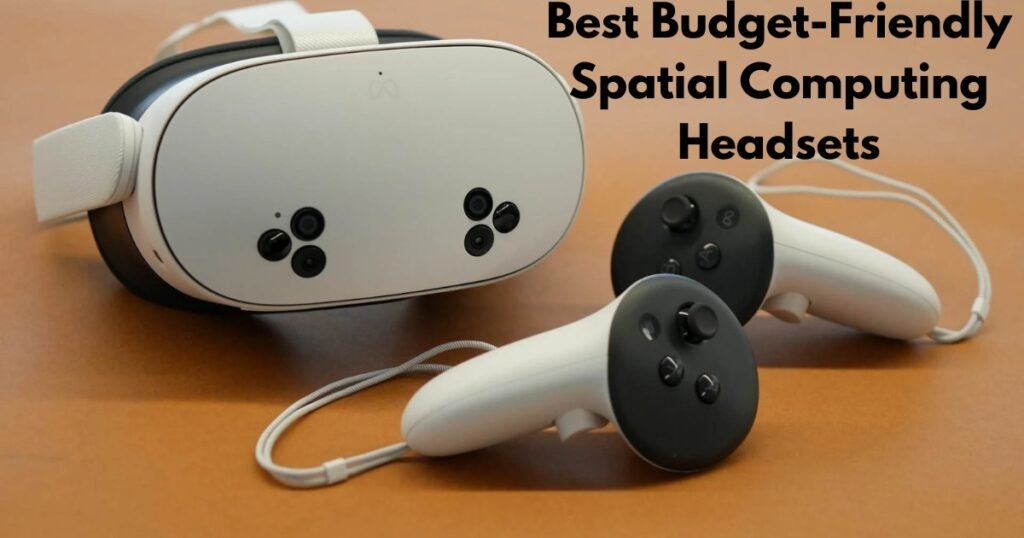
The most affordable spatial computing headset in 2026 is the Meta Quest 3S, priced at approximately $299. It utilizes the powerful Snapdragon XR2 Gen 2 chip to deliver high-quality color passthrough. For those prioritizing productivity and comfort, the Pico 4 Ultra ($399–$450) offers superior lens clarity and weight distribution.
What is Spatial Computing on a Budget?
Before diving into the hardware, it is vital to distinguish between traditional Virtual Reality (VR) and modern Spatial Computing.
In the past, “budget VR” meant being walled off from your surroundings. You wore a plastic box, saw a digital world, and hoped you didn’t trip over your coffee table. In 2026, Spatial Computing headsets use high-resolution cameras to “pass through” a live feed of your room. This allows you to:
-
Pin a floating 100-inch virtual monitor above your actual physical desk.
-
Follow a floating recipe window while you cook in your real kitchen.
-
Play “Mixed Reality” (MR) games where characters hide behind your actual furniture.
The “budget” category now targets the $300 to $600 price range, providing roughly 80% of the functionality of high-end devices like the Apple Vision Pro or Samsung Galaxy XR.
The Top 3 Budget-Friendly Spatial Computing Headsets of 2026
The market has consolidated into three clear winners, each serving a different type of “hybrid” user.
1. Meta Quest 3S: The Best All-Rounder ($299)
Meta’s strategy for 2026 was simple: put the “brains” of their flagship Quest 3 into a more affordable chassis. The Quest 3S is the undisputed king of the entry-level market.
-
The Tech: It uses the Snapdragon XR2 Gen 2 processor, which is the gold standard for mobile spatial computing. This ensures that every modern MR app runs smoothly.
-
The Trade-off: To hit the $299 price point, Meta used Fresnel lenses (the older, bulkier lens style) rather than the slim “Pancake” lenses found on the Quest 3. This makes the headset slightly thicker and the image less sharp at the edges.
-
Best For: Most consumers, gamers, and those new to mixed reality.
2. Pico 4 Ultra: The Productivity Powerhouse ($399 – $449)
Owned by ByteDance, Pico has carved out a massive following in Europe and Asia by focusing on what Meta often overlooks: out-of-the-box comfort and clarity.
-
The Tech: Unlike the Quest 3S, the Pico 4 Ultra features Pancake Lenses. These are thinner and provide edge-to-edge clarity, which is essential if you plan on reading text (emails, spreadsheets, or code) for hours.
-
The Secret Weapon: It boasts 12GB of RAM (compared to the Quest’s 8GB) and natively supports Apple Spatial Video decoding. This means you can view 3D memories captured on an iPhone with stunning realism.
-
Best For: Remote workers, “Virtual Desktop” enthusiasts, and users outside the US.
3. XREAL Air 2 Ultra: The “Spatial Lite” Alternative ($699)
If you find bulky goggles intimidating, the XREAL Air 2 Ultra offers a different path. These are high-tech AR glasses that look like slightly thick Wayfarers.
-
The Tech: They use dual 1080p Micro-OLED displays to project a massive screen in front of you. Unlike cheaper AR glasses, the “Ultra” model includes 6DoF (Six Degrees of Freedom) sensors, meaning your virtual screens stay “locked” in space even as you move your head.
-
Best For: Frequent travelers, digital nomads, and people who want a private theater on a plane without the “diver mask” look.
Budget Headset Comparison (2026 Standards)
The Hybrid Framework: How to Use These for Work and Play
One of the biggest “content gaps” in typical reviews is how these devices actually fit into a daily routine. In 2026, the best users are “Hybrid” users.
The 9-to-5: The Virtual Office
Using a budget headset like the Pico 4 Ultra or Quest 3S with an app like Immersed allows you to spawn three virtual monitors from a single laptop.
-
Step 1: Connect your laptop via Wi-Fi 6E/7 or a Link Cable.
-
Step 2: Open your “Spatial Workroom.”
-
Step 3: Use Passthrough mode to see your physical keyboard while your screens float in a serene mountain landscape.
-
Why it works: It eliminates the need for an expensive physical multi-monitor setup and works in tiny apartments or hotel rooms.
The 5-to-9: Immersive Entertainment
When the workday ends, these devices transform.
-
Fitness: Apps like Supernatural or Les Mills use spatial tracking to turn your living room into a gym.
-
Gaming: Titles like Batman: Arkham Shadow (often bundled with the Quest 3S) provide a level of immersion that a 2D television simply cannot match.
Hardware Standards: What to Look for (and Avoid)
When shopping for a “cheap” headset in 2026, do not just look at the price tag. Ensure the device meets these minimum technical standards:
-
Chipset: Ensure it has at least a Snapdragon XR2 Gen 2. Avoid older “Gen 1” chips, as they will struggle with the latest 2026 software updates.
-
Lenses (The Warning): While Fresnel lenses are cheaper, Pancake lenses are the gold standard for 2026. If your goal is to read text for more than 30 minutes, the extra $100 for a headset with Pancake lenses is the best investment you can make.
-
Passthrough Quality: Look for “Color Passthrough.” Older headsets with “Black and White” passthrough are not true spatial computers; they are strictly VR devices.
-
IPD Adjustment: Ensure the headset allows you to adjust the distance between the lenses (Interpupillary Distance). If the lenses don’t align with your eyes, you will experience headaches and “god rays” (visual blurring).
The Hidden Costs: Total Cost of Ownership
The “sticker price” is rarely the final price. To make a budget headset truly “pro,” you often need a few extras:
-
Aftermarket Headstraps ($30–$60): The cloth straps included with budget Quest models are notoriously uncomfortable. Most users upgrade to a “Halo” or “Elite” style strap.
-
Prescription Lenses ($50): If you wear glasses, don’t shove them into the headset. Companies like Zenni or VR Optician make snap-in lenses that protect the headset and improve comfort.
-
Battery Packs ($40): Most budget units only last 2 hours. A neck-worn or strap-mounted battery is essential for long work sessions.
Global Availability: Where to Buy
Common Mistakes to Avoid
-
Buying the Quest 2 in 2026: Even if you find it for $150, do not buy it. It lacks the mixed reality sensors and processing power required for modern spatial apps. It is a dead-end platform.
-
Ignoring Privacy Settings: Spatial computers literally “map” your home. Always review the “Spatial Data” settings in your OS (Horizon OS or Pico OS) to control what data is shared with developers.
-
Underestimating Space: Even with mixed reality, you need a clear “guardian” area. Don’t try to use high-intensity fitness apps in a cluttered 4×4 closet.
Entity Glossary
-
PPD (Pixels Per Degree): The metric for how “sharp” an image looks. Human vision is roughly 60 PPD; budget headsets are currently around 20–25 PPD.
-
6DoF Tracking: “Six Degrees of Freedom.” This means the headset tracks your rotation and your movement through space.
-
Spatial Video: A video format that captures depth, allowing you to “look around” the edges of a recorded memory.
-
Horizon OS: The operating system developed by Meta, now being opened up to other hardware manufacturers like ASUS and Lenovo.
People Also Ask (FAQs)
1. Can I actually run Microsoft Excel or Slack on these?
Yes. By using a “Virtual Desktop” app or the native browser, you can run web-based versions of almost any productivity tool. However, for long sessions, the Pico 4 Ultra or Quest 3 are better than the Quest 3S due to lens clarity.
2. Is the Meta Quest 3S better than the Quest 3?
The Quest 3S has the same power but inferior lenses and resolution. It is a better value, but the Quest 3 is still the technically superior device.
3. Can I use a budget spatial headset with my MacBook?
Yes. You can use the “Virtual Desktop” or “Immersed” apps to mirror your Mac’s screen. It’s a popular way to get a “Vision Pro” experience for $300.
4. Do these headsets cause motion sickness?
In 2026, most headsets use high refresh rates (90Hz or 120Hz) and low-latency passthrough, which drastically reduces motion sickness compared to older 2020-era models.
5. Are there any “hidden” monthly fees?
The hardware has no subscription, but many of the best apps—like Supernatural (fitness) or certain premium work environments—require a monthly sub.
6. Can I watch movies in “Theater Mode”?
Absolutely. All these headsets allow you to open a streaming app (Netflix, Disney+, YouTube) and scale the screen to the size of a movie theater wall.
7. What is the best budget headset for kids?
The Meta Quest 3S is generally considered the best for younger users (13+) due to the parental controls in Horizon OS and the vast library of family-friendly games.
Conclusion: Making the Final Decision
Spatial computing is no longer a “someday” technology—it is a “today” tool. If you are on a strict budget, the Meta Quest 3S is the clear winner for its price-to-performance ratio. However, if you are a professional who plans to spend 4+ hours a day inside the device, the Pico 4 Ultra’s pancake lenses and superior comfort make it well worth the extra $100.
Next Steps:
-
Check your IPD: Download a free “IPD Measure” app on your phone. If your eyes are very close together or far apart, ensure your chosen headset has a physical slider to match.
-
Test a demo: Visit a local Best Buy (US) or Currys (UK) to try the passthrough quality for yourself.
-
Budget for comfort: Set aside an extra $50 for a third-party headstrap; your neck will thank you later.