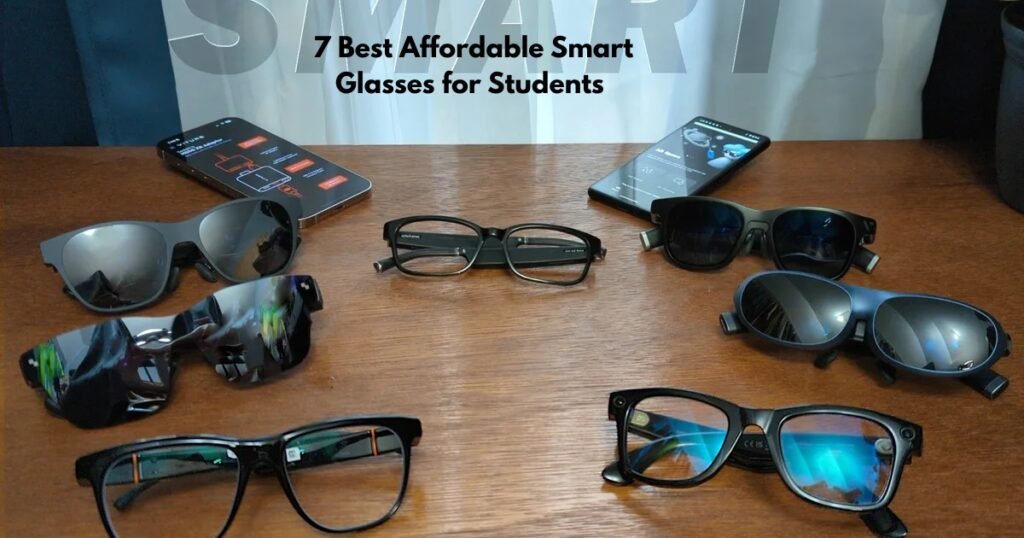
Meta Description: Compare the best budget Affordable Smart Glasses for Students . Expert reviews on Ray-Ban Meta, Xreal, and Solos for AI note-taking, AR study screens, and campus life.
The landscape of student productivity has shifted. In 2026, the laptop and tablet are being joined—and in some cases, replaced—by smart eyewear. For the average student, the goal isn’t just “cool tech“; it’s finding a way to survive a 20-credit hour semester while keeping notes organized and eyes protected.
Affordable smart glasses have finally hit a price point (under $300) where they make sense for a college budget. Whether you need a virtual 100-inch screen for your dorm room or an AI assistant that can summarize a whiteboard in real-time, there is now a frame for your specific major.
The Student Decision Matrix: Screen or Assistant?
TL;DR: If you want to watch lectures or code on a giant virtual monitor, get AR Display glasses (Xreal/RayNeo). If you want an AI tutor to answer questions and record reminders, get Audio/AI glasses (Meta/Solos).
Before diving into specific reviews, you must identify your primary academic bottleneck. Students generally fall into two camps:
-
The Visual Researcher: Needs to see multiple tabs, coding environments, or spreadsheets without carrying a physical monitor.
-
The Active Learner: Needs hands-free help, real-time translation for study abroad, or a way to record lab demonstrations.
| Feature | Audio/AI Glasses (e.g., Ray-Ban Meta) | AR Display Glasses (e.g., Xreal Air 2) |
| Primary Tech | Multimodal AI & Spatial Audio | Micro-OLED Displays & Waveguide Optics |
| Weight | 45g – 50g (Lightweight) | 72g – 85g (Slightly heavier) |
| Best For | Audio notes, AI queries, Photography | Coding, Gaming, Writing, Privacy |
| Price Range | $160 – $329 | $299 – $450 |
1. Ray-Ban Meta: The Ultimate AI Research Assistant
The Ray-Ban Meta frames have become the “it” device on global campuses this year. They don’t have a screen, but they possess something more valuable for many: Multimodal AI.
Using the “Look and Ask” feature, a student can look at a complex organic chemistry structure and ask, “Meta, explain this reaction.” Within seconds, the AI provides an audio breakdown through the open-ear speakers.
-
Student Use Case: Recording 60-second “POV” clips of engineering projects or dissecting biology specimens hands-free.
-
Battery Reality: You’ll get about 4 hours of active use. The charging case is essential for long days in the library.
-
Compatibility: Works seamlessly with iPhone 14 through iPhone 17 and high-end Android devices.
2. Xreal Air 2 & RayNeo Air 3s: The Virtual Dorm Room
If you’re living in a cramped dorm, you don’t have space for a dual-monitor setup. AR glasses like the Xreal Air 2 or the RayNeo Air 3s use DisplayPort Alt Mode via USB-C to project a massive, high-definition screen in front of your eyes.
The RayNeo Air 3s, specifically, has emerged as a budget favorite for 2026 due to its superior Micro-OLED clarity and lower price point. It’s a “private cinema” for your textbooks.
-
Student Use Case: Connecting to a MacBook or iPad to write an essay while lying in a dorm bunk.
-
The Gap: Unlike competitors, these models now include “Whisper Mode” to ensure your lecture audio doesn’t annoy your roommate.
3. Solos AirGo3: The Language & Translation Specialist
For students majoring in linguistics or studying abroad in Europe or Asia, the Solos AirGo3 is the dark horse winner. It integrates directly with ChatGPT-4o and features a dedicated live translation mode.
-
The Tech: It uses a modular design, meaning you can swap the “smart” temples between different frame styles (sunglasses vs. blue-light clear lenses).
-
Price Point: Often found for under $200, making it one of the most accessible entry points for smart eyewear.
How to Set Up Smart Glasses for Lecture Recording
Affordable Smart Glasses for Students
TL;DR: Check your syllabus first. If cleared, use a “single-tap” shortcut to capture high-quality audio and video without fumbling with your phone.
-
Check Compliance: Ensure the “Privacy LED” on your glasses is unobstructed. This light notifies others that you are recording, which is a legal and ethical requirement on most campuses.
-
Sync to Cloud: Set your glasses to auto-upload to a folder (like Notion or Google Drive) so your lecture notes are ready on your laptop by the time you walk back to the dorm.
-
Optimize Audio: Position yourself in the first three rows. While these glasses have beamforming mics, they perform best when the professor is within 15 feet.
The Economics of Smart Glasses: Student Discounts & GEO Availability
Smart glasses are a global product, but where you buy them matters.
-
United States/UK: Use UNiDAYS or Student Beans for 10-15% off at Meta or Amazon.
-
Global/Europe: Many tech hubs in cities like Berlin, London, and Tokyo now offer “Try Before You Buy” programs at local electronics retailers.
-
Prescription Needs: Don’t buy the frames and then realize you can’t see. Companies like VR Wave and Lensabl offer custom prescription inserts for Xreal and Meta frames. Alternatively, local opticians in major cities are increasingly trained to fit lenses into the Ray-Ban Meta line.
Academic Integrity: The Elephant in the Room
Can you wear smart glasses during an exam? In 99% of cases: No.
Most universities have updated their academic integrity policies for 2026. Smart glasses are treated similarly to smartphones. Even if you are just using them for blue-light protection, the presence of a camera or a Bluetooth connection can lead to an automatic disqualification.
The “Study Mode” Loophole: Use them for the preparation—summarizing readings, flashcard drills via voice, and keeping your posture upright (AR glasses prevent the “tech neck” caused by leaning over a laptop).
Critical Factors: Battery Life & Connectivity
One of the biggest user pain points is the “dead battery mid-lecture” syndrome.
-
Audio-only frames (Echo Frames/Solos): These will generally last a full 8-hour day of intermittent music and notifications.
-
AR Display frames (Viture/Xreal): These draw power from your phone or laptop. If your phone is at 20%, using AR glasses will kill it in 30 minutes. Always carry a power bank with Power Delivery (PD) support.
Entity & Tech Glossary for Students
-
Waveguide Optics: The technology that allows AR glasses to stay thin while projecting an image.
-
Spatial Audio: Sound that feels like it’s coming from the world around you, not just “in” your ears.
-
Haptic Feedback: Small vibrations in the frame that notify you of a calendar event without a loud beep.
-
IPX4 Water Resistance: Safe for walking across campus in light rain, but don’t take them to the pool.
7+ People Also Ask (FAQs)
Are smart glasses worth it for college?
Yes, if you struggle with screen fatigue or need hands-free organization. They are less of a “distraction” than a phone because they keep your head up and your hands free.
Which smart glasses have the best AI for studying?
The Ray-Ban Meta is currently the leader due to its multimodal AI which can “see” and interpret your study materials.
Can I get prescription lenses for smart glasses?
Yes. Most brands offer a prescription “kit” or have partnerships with providers like LensCrafters to ensure you don’t have to wear your smart glasses over your regular ones.
Do smart glasses work with iPhones and Android?
Most use Bluetooth 5.3 and are platform-agnostic. However, features like Apple’s “Siri” or Google’s “Gemini” integration might be smoother on their respective native devices.
What are the best AR glasses for coding?
The Viture Pro and Xreal Air 2 Ultra are highly rated for coding because of their text clarity and “multi-window” support on Mac and Windows.
Are there any smart glasses under $100?
The Razer Anzu and older generations of Amazon Echo Frames can often be found for under $100. They lack cameras but are excellent for audiobooks and blue-light protection.
How do I prevent eye strain while using AR glasses?
Look for glasses with TÜV Rheinland certification for low blue light and flicker-free displays. Take a 5-minute break every hour.
Conclusion
The “best” affordable smart glasses for students in 2026 aren’t necessarily the most expensive ones. If you are a student who spends 8 hours a day looking at code, the Xreal Air 2 or RayNeo Air 3s will revolutionize your workflow by giving you a massive, ergonomic workspace. If you are a social science or humanities student who needs to record interviews and stay on top of a busy schedule, the Ray-Ban Meta or Solos AirGo3 are your best bets.
As campus rules evolve, these devices will become as common as noise-canceling headphones. By choosing a pair that fits your specific academic needs now, you’re not just buying a gadget—you’re upgrading your entire approach to learning.
Read more: 5 best Tech Gadgets…………….